
Audio File Renamer / Text File Generator
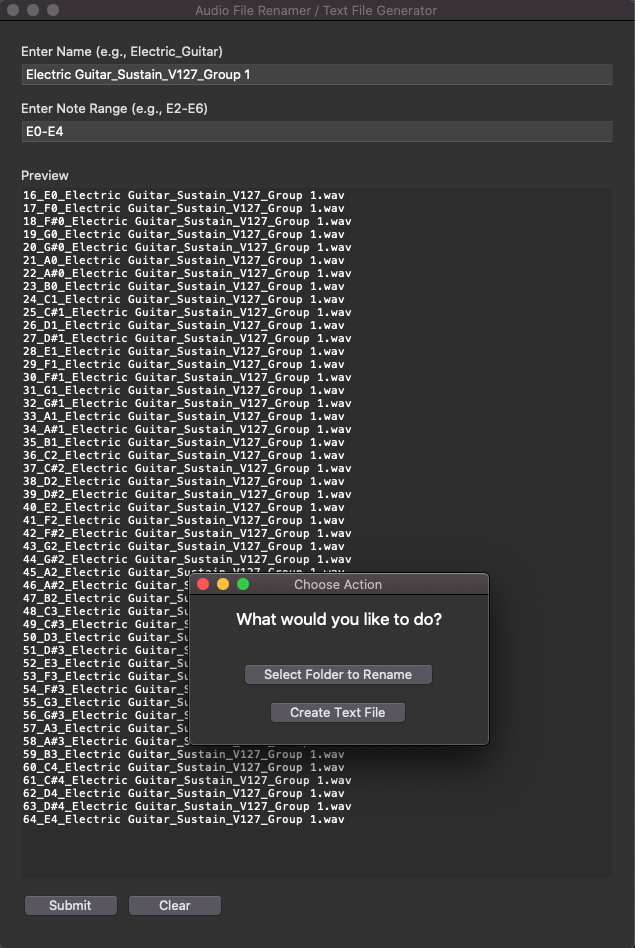
A Python GUI application for managing audio file names in a musical context. This tool helps musicians and audio engineers to:
- Generate text files containing standardized audio file names based on MIDI note ranges
- Batch rename audio files according to MIDI note numbers and names
Features
- User-friendly GUI interface
- Live preview of file names
- Support for various audio file formats (.wav, .aif, .aiff, .mp3)
- Automatic backup creation before renaming files
- MIDI note range validation
- Standardized naming convention:
{MIDI_number}_{Note_name}_{Instrument_name}.wav
Installation
- Clone this repository:
- Install required packages:
git clone https://github.com/frankiefaruk/Audio_File_Rename.git
cd audio-file-renamerpip install -r requirements.txtUsage
- Run the application:
- Using the Text File Generator:
- Enter instrument name (e.g., "Electric_Guitar")
- Enter note range (e.g., "E2-E6")
- Click "Submit"
- Choose "Create Text File"
- Select save location for the text file
- Using the File Renamer:
- Enter instrument name (e.g., "Electric_Guitar")
- Enter note range (e.g., "E2-E6")
- Click "Submit"
- Choose "Select Folder to Rename"
- Select folder containing audio files
- Review the preview of changes
- Click "Rename" to process files
python main_gui.pyFile Naming Convention
The application uses the following naming convention:
Format: {MIDI_number}_{Note_name}_{Instrument_name}.wav
Example: 60_C4_Electric_Guitar.wav
Safety Features
- Creates automatic backups before renaming files
- Validates note ranges before processing
- Preview changes before applying
- Error handling and user feedback
Contributing
- Fork the repository
- Create your feature branch (
git checkout -b feature/AmazingFeature) - Commit your changes (
git commit -m 'Add some AmazingFeature') - Push to the branch (
git push origin feature/AmazingFeature) - Open a Pull Request
License
This project is licensed under the MIT License - see the LICENSE file for details.